A companion's "selfie" usually has no camera behind it. The chat model writes out the scene in words, then a separate image model turns those words into a picture. Nearly everything in this guide flows from that split, and how AI girlfriend images and voice work explains the machinery.
What makes her face wander
- No memory of the last picture. Each render begins from nothing, so the face gets invented again.
- Her description drifts. If the chat model words her looks slightly differently each time, the image model follows.
- Crowded prompts win over identity. A complicated scene leaves little weight for the features that make her her.
Some apps counter this with a locked reference image or a model trained on one character. Across our tests, Candy AI kept a single face going for the longest stretch. On apps without that, your own habits matter more.
Write her look down and keep it fixed
Before asking for anything, put her appearance into the builder or description field in precise terms. Fuzzy ideas such as "pretty, dark hair" leave the model to improvise. Exact ones give it a target:
| Fuzzy idea | Exact version |
|---|---|
| Pretty, dark hair | Straight black hair down to her shoulders, with a fringe |
| Nice eyes | Green eyes, heavy eyebrows |
| Slim | Slim build, 1.70 m, athletic shoulders |
| Stylish | Usually in a chunky jumper and small silver hoops |
After that, don't change the text. If a picture looks wrong, judge it against your description rather than rewriting the description to match the picture.
Anatomy of a request that works
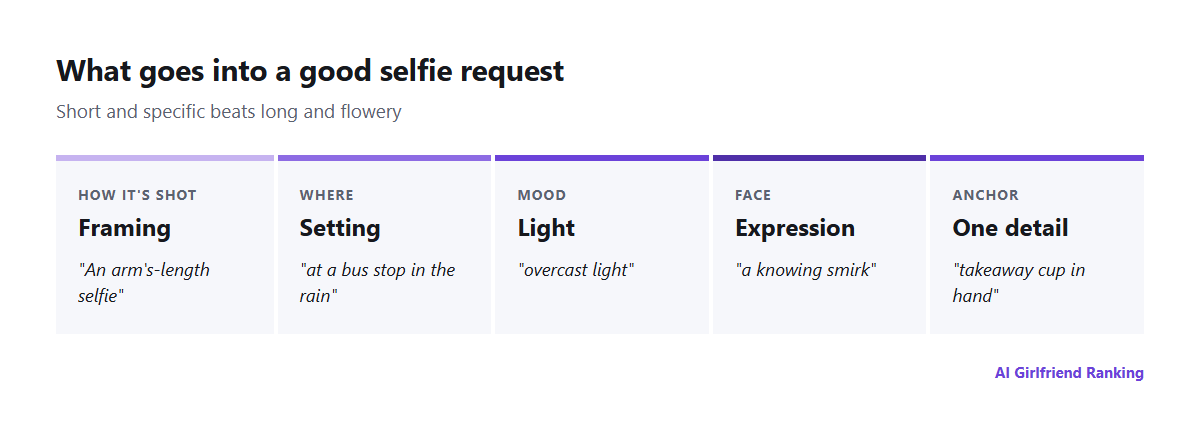
Short and specific beats long and flowery.
- Framing: arm's-length selfie, bathroom mirror, head and shoulders, head to toe.
- Setting: a bus stop in the rain, a beachside kiosk, a messy kitchen at midnight.
- Light: overcast daylight, a lamp glow, flash on, sunset.
- Expression: grinning, sleepy, concentrating, a knowing smirk.
- One detail: a takeaway cup, a ponytail, a puffer jacket.
A request like "arm's-length selfie at a bus stop in the rain, overcast light, knowing smirk, takeaway cup in hand" tends to beat a paragraph praising her beauty.
Saving credits as you go
- Alter one thing at a time. Wrong lighting? Touch nothing but the lighting. Changing five things at once tells you nothing about what helped.
- Plan in chat, render later. Ask her to describe the shot she'd send, edit that description as text, and only then request the image. Words cost little or nothing, and renders don't. See the real cost of AI image generation.
- Reuse what worked. Keep a running note of prompts that gave good results, and copy their layout.
- Watch the cap. Lots of plans limit images per day or month, so look before a long session.
Holding a look across weeks
- Never edit the appearance description.
- Put one signature item into most prompts, like matching earrings or the same hairstyle.
- Skip extreme angles and heavy effects, since they distort faces worst.
- If the app lets you pick a "reference" or "base image", choose carefully and then leave it.
Privacy, consent and Australian law
Everything you generate is stored by the company, frequently at links that are easier to reach than you'd think. See where your pictures actually live. Two rules follow:
- Don't upload a real person's photo to model a character on. Face-swap features have produced non-consensual sexual images of real women, and open storage in 2025 exposed thousands of them. Under Australia's Criminal Code Amendment (Deepfake Sexual Material) Act 2024, sending sexually explicit deepfakes of a real adult without their consent is a federal offence, with a maximum of six years in prison. If intimate images of you have been made or shared, you can report it to the eSafety Commissioner.
- Be cautious with your own face. It leaves a picture of you in a database you have no control over.
Good results mostly mean being precise once and consistent afterwards. The model handles the painting, and you decide how much is left to luck.