The same companion can seem lifeless one day and vivid the next. Nine times out of ten, the difference is how the scene opened, and that's what this guide covers.
Why openers go flat
Under the hood, a language model predicts the next words from all the text so far, as explained in how an AI companion writes its reply. That leads to three tendencies.
- It copies your length. Send one line and you'll get one line back. Send a paragraph and you'll get a paragraph.
- It copies your style. Write in present tense with small physical details and you'll get the same back. Type "hey wanna rp" and expect that register.
- It fills blanks with the most average choice. If you skip the place and time, it grabs the commonest setting from its training, which is why so many stories open in a cafe.
No secret phrase exists, then. What works is supplying enough story for the model to pick up.
Four ingredients for a scene
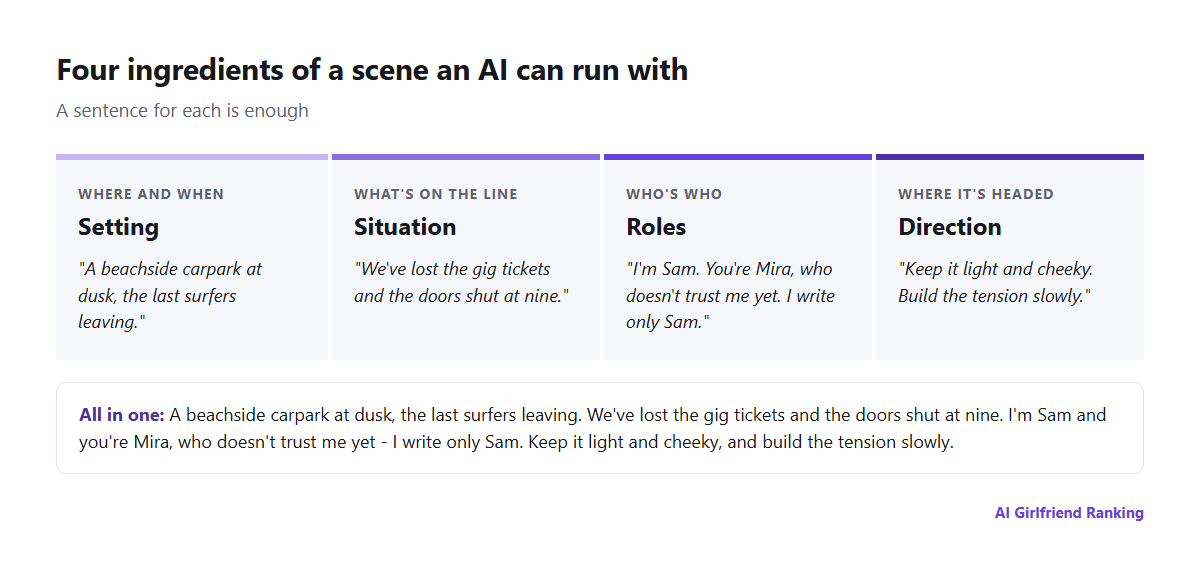
A workable scene has all four parts, and one sentence each does the job.
Setting means where and when, plus a detail or two you can picture: "a beachside carpark at dusk, the last surfers wandering off", not just "a city".
Situation is what has just gone wrong or what's at stake. Without one, the scene has no reason to happen.
Roles spell out who you are, who the character is in this scene and what each of you knows. It's also the place to say you're playing only yourself.
Direction tells it what you want next: tone, pace, the destination, and any limits.
Weak openers next to strong ones
| Weak | Strong |
|---|---|
| "Let's go on a date." | "Friday night at a tiny Italian place you chose because it's meant to be quiet. It isn't: a birthday party has taken over the next table. I show up ten minutes late and drenched. Sorry, the tram broke down. You look great, by the way." |
| "Be my girlfriend on a holiday." | "Day three of our road trip down the coast. The car's air-con died an hour ago and we've been bickering, half-joking, about whose idea this was. I pull into a servo. You play yourself and I play only me. Keep it light and cheeky." |
| "Fantasy roleplay please." | "A border town the night before a festival. You're the healer who stitched me up this morning and I'm a courier who can't pay. You haven't made up your mind about trusting me. Slow burn: let the tension build across several scenes." |
The strong versions aren't padded. Each one settles the four questions and ends on something the character can respond to.
Steering once you're underway
Out-of-character notes. Most models treat a short bracketed aside as a word to the author instead of the character: (OOC: ease off, give me more talking and less description.) Keep it short and put it at the end of your turn.
Time skips. Drop in something like [Two hours later, back at the flat.] and a stuck scene moves on far more reliably than if you ask the character to change topic.
Regenerate or edit. When a reply misses, hit regenerate or edit it instead of debating it in the chat. Whatever stays behind becomes a pattern the model repeats.
Describe the goal, not the fault. "She speaks in short, dry sentences" tends to land better than "stop rambling", because naming the fault puts it into the text being continued.
Change one thing per message. Ten rules at once blur into none. Sort out the biggest problem, then move on to the next.
Holding a long scene together
Given enough time, a roleplay outruns what the model can review each turn and the early details slide out. It's the same ceiling described in how AI companion memory works. Two habits make a difference:
- Recap regularly. Three OOC lines covering where you are, what's happened and what counts will bring the essentials back into view.
- Park fixed facts in the memory or notes field: names, relationships, injuries, promises, anything that mustn't wander.
If the character still contradicts itself, it isn't brushing you off. It's invented a detail to plug a hole, as why AI companions invent memories explains. A quick correction, then keep going.
Where the character sheet fits
Scene prompts layer over the character's standing description. When one flaw shows up in every scene, whether it's too stiff, too keen or the same pet name every time, correct the character itself instead of each scene. The character builder guide explains which fields count.
If a scene stops dead with a refusal, blame the app's filter, not your wording. The different filter types, and the reason even lenient apps have a floor, are covered in content filters.